English

Your gym,managed anywhere.Your app, for members.

Open the Praesidium Register on a computer, tablet or phone to see who is at the gym, check memberships and manage entry. Members use your branded app to enter, train and book; trainers use their own app to follow plans and progress.

No-obligation demo · Free fit assessment · iOS + Android apps · Already in use at Italian sports centers
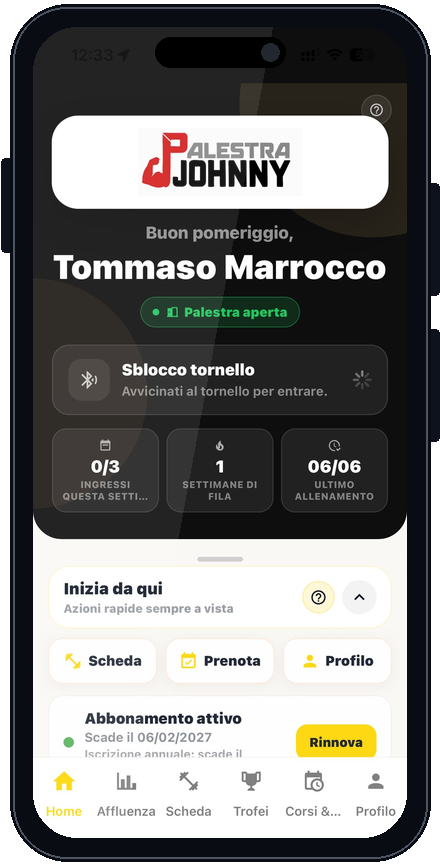
Member app home screen with the gym logo, turnstile opening, workout plan and bookings
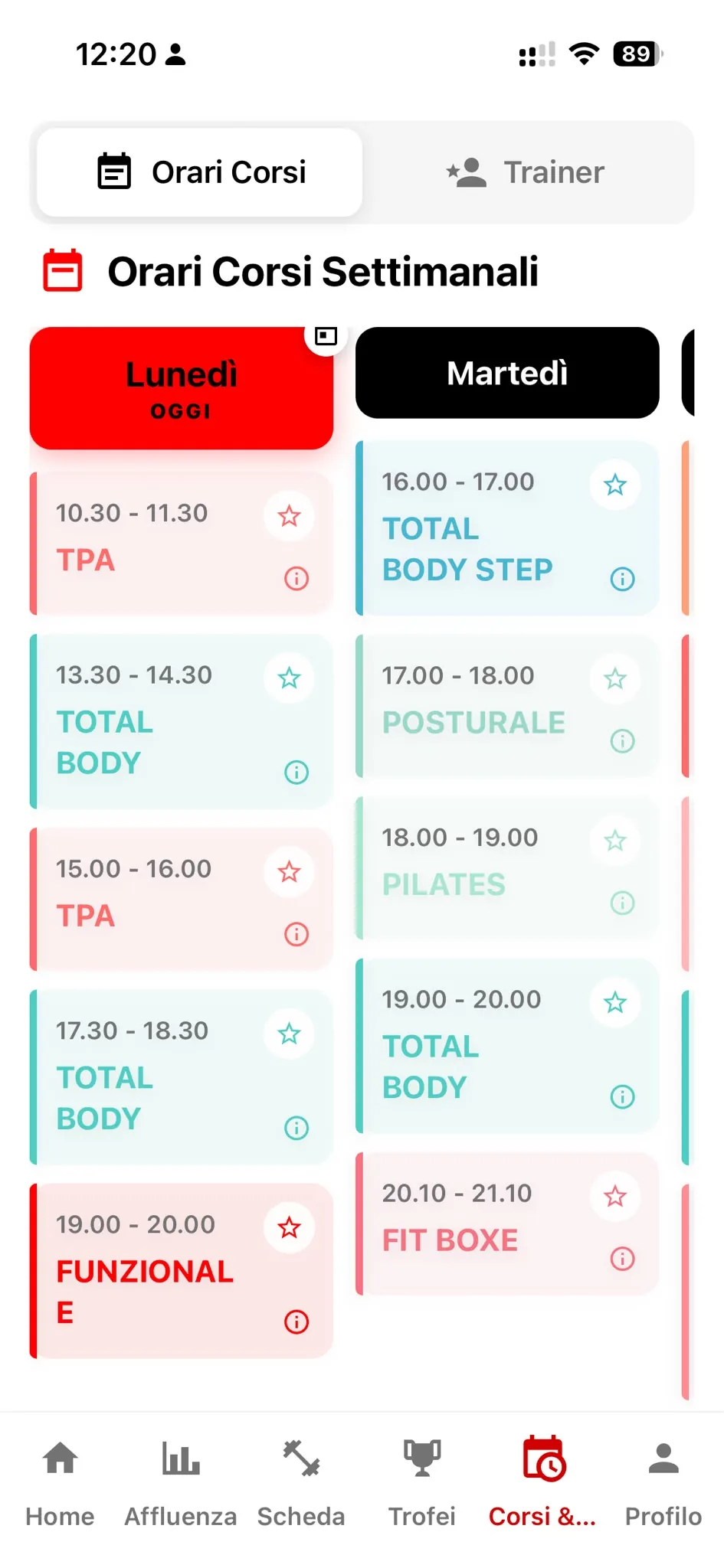
Class calendar and schedule in the Praesidium member app
Digital workout plan in the member app with exercises, reps and a rest timer
App Store + Play Store
Your gym’s name and logo

The Praesidium system

You manage. Trainers coach. Members train.

An online Register for staff, a trainer app and a member app with your brand. Entry, bookings and workouts update shared records, without copying information between separate tools.

Operations

  • 01
    Cloud consoleOpen the Register in a browser to manage members, memberships and renewals away from the gym.
  • 02
    Access & turnstileMembers use NFC or their app near the turnstile; staff see the entry.
  • 03
    Live attendanceSee who is currently inside and review the entry history.
  • 04
    Roles & permissionsEach person can use the operations permitted for their role.

Training

  • 05
    Trainer SuiteTrainers create and assign plans; members receive them in their app.
  • 06
    Interactive workout plansMembers log weights and reps and use the timer between sets.
  • 07
    PT bookingsMembers book in the app; trainers manage availability and appointments.
  • 08
    White-label member appYour gym in the app stores, with your logo, colours and member services.

Growth

  • 09
    Announcements & push notificationsChoose recipients and publish in-app announcements, with an optional push notification.
  • 10
    Marketing AdvisoryCompare attendance and last visits, then contact members who are drifting away.
  • 11
    AnalyticsReview entry, memberships and trends in the Overview dashboard.
  • 12
    Setup & go-liveStep-by-step support for migration, app stores, onboarding and technical requirements.
Scroll to see the system in action

Benefits by role

What changes in everyone’s day.

Start with your role: staff run the gym, trainers guide workouts and members use the app. Each card explains a specific Praesidium tool.

Staff & management

Your gym, even when you are elsewhere

Open the Register to check who is inside, review flagged cards, publish announcements and follow up with members who have stopped coming.

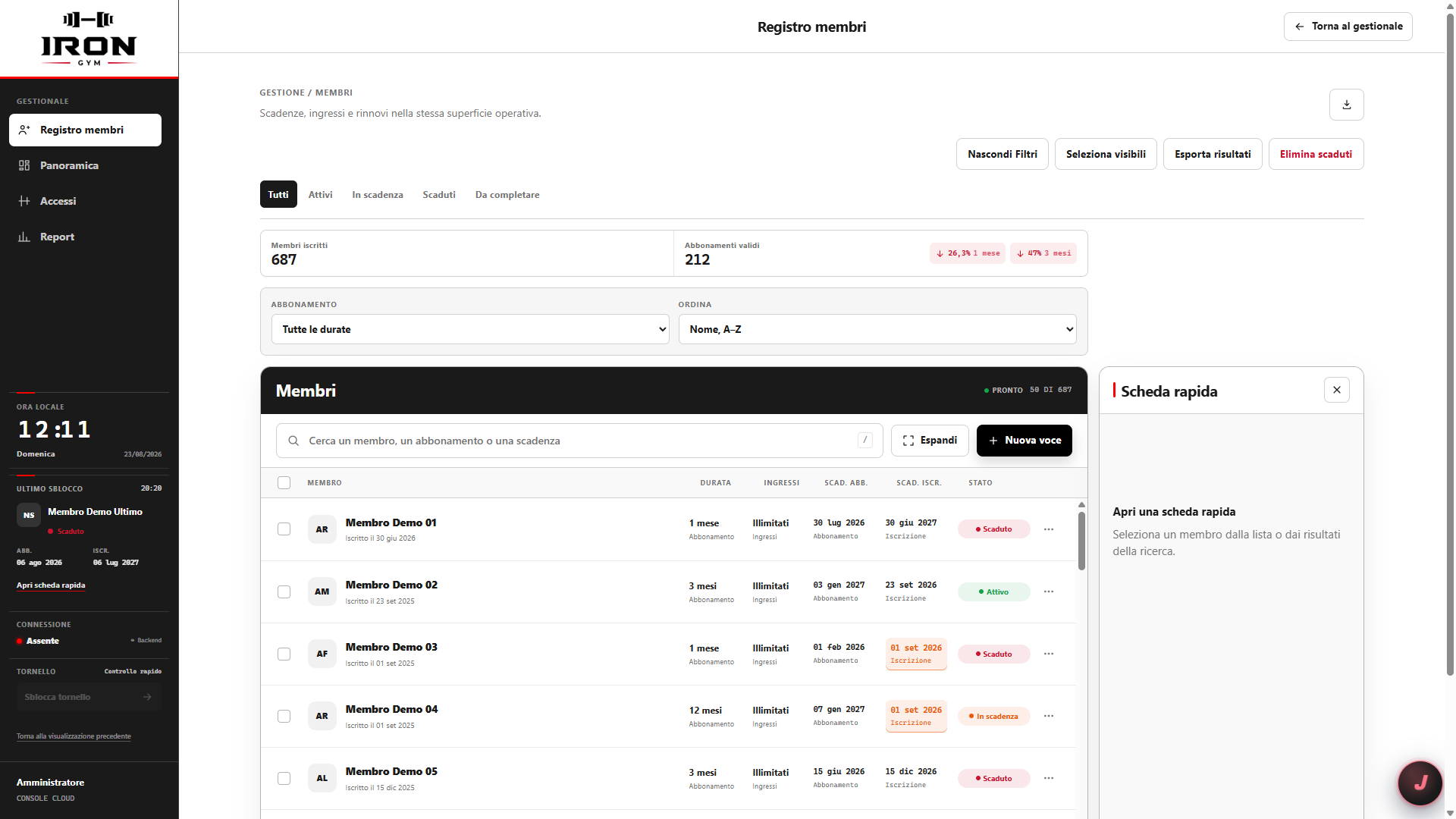
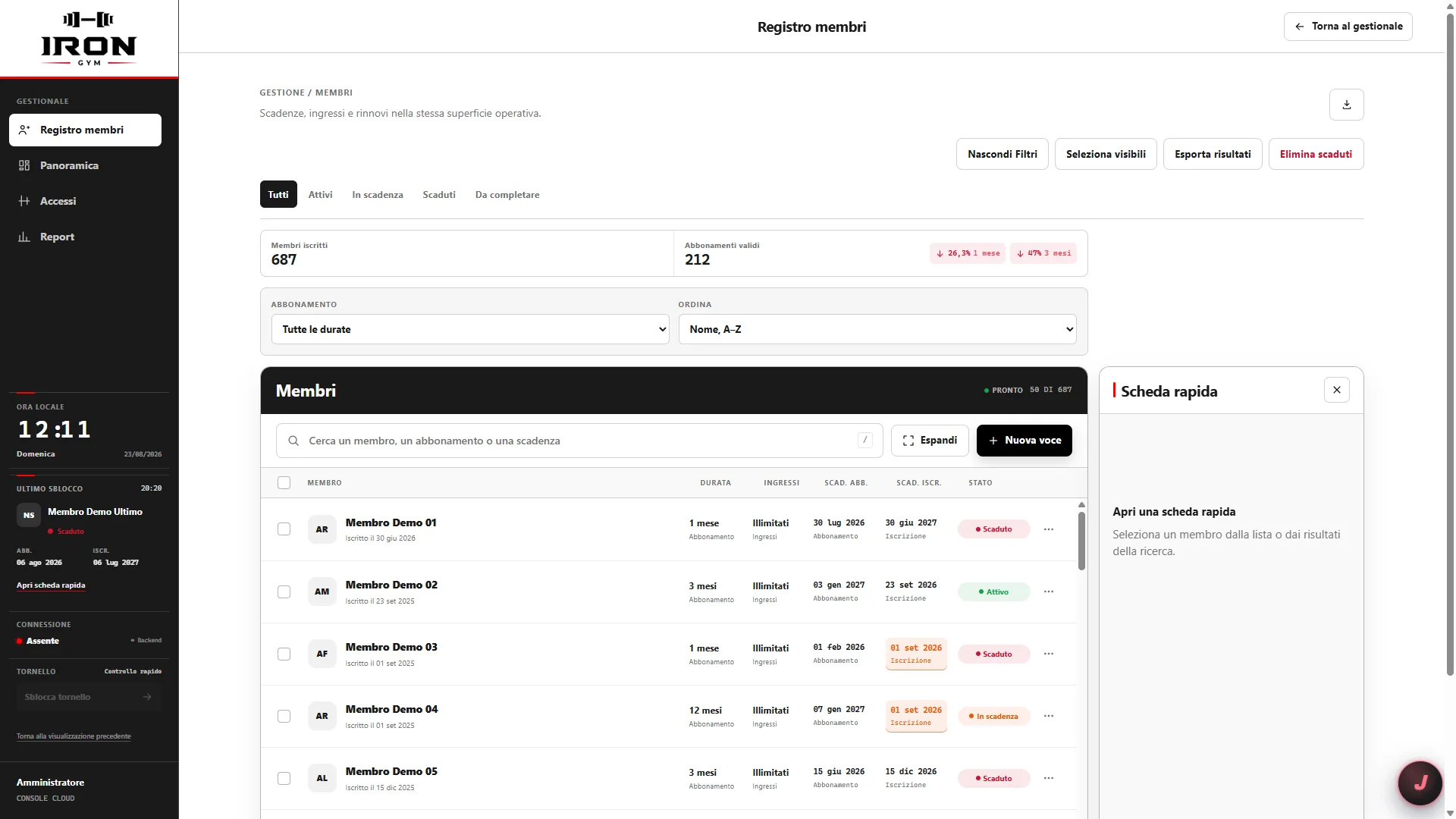
Member Register with search, status filters and a quick record
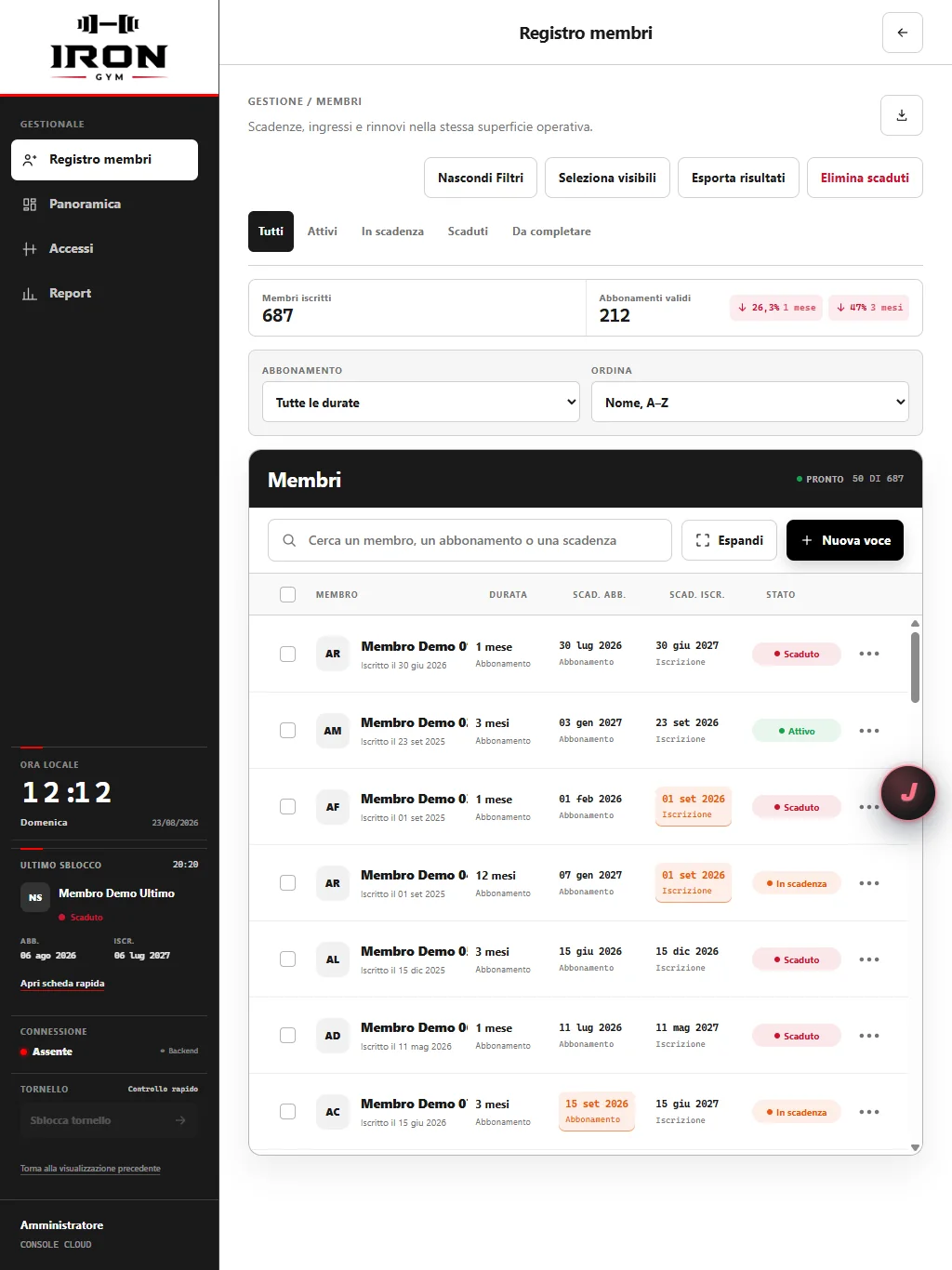
Member Register in its tablet layout

Computer and tablet. One Register.

Cloud Register

Check attendance and memberships remotely

Open the Register in a browser on your computer, tablet or phone. See who is inside, membership expiry dates, renewals and entry history.

Staff and management work on the same records, so you can check the gym’s status without calling reception or waiting for a report.
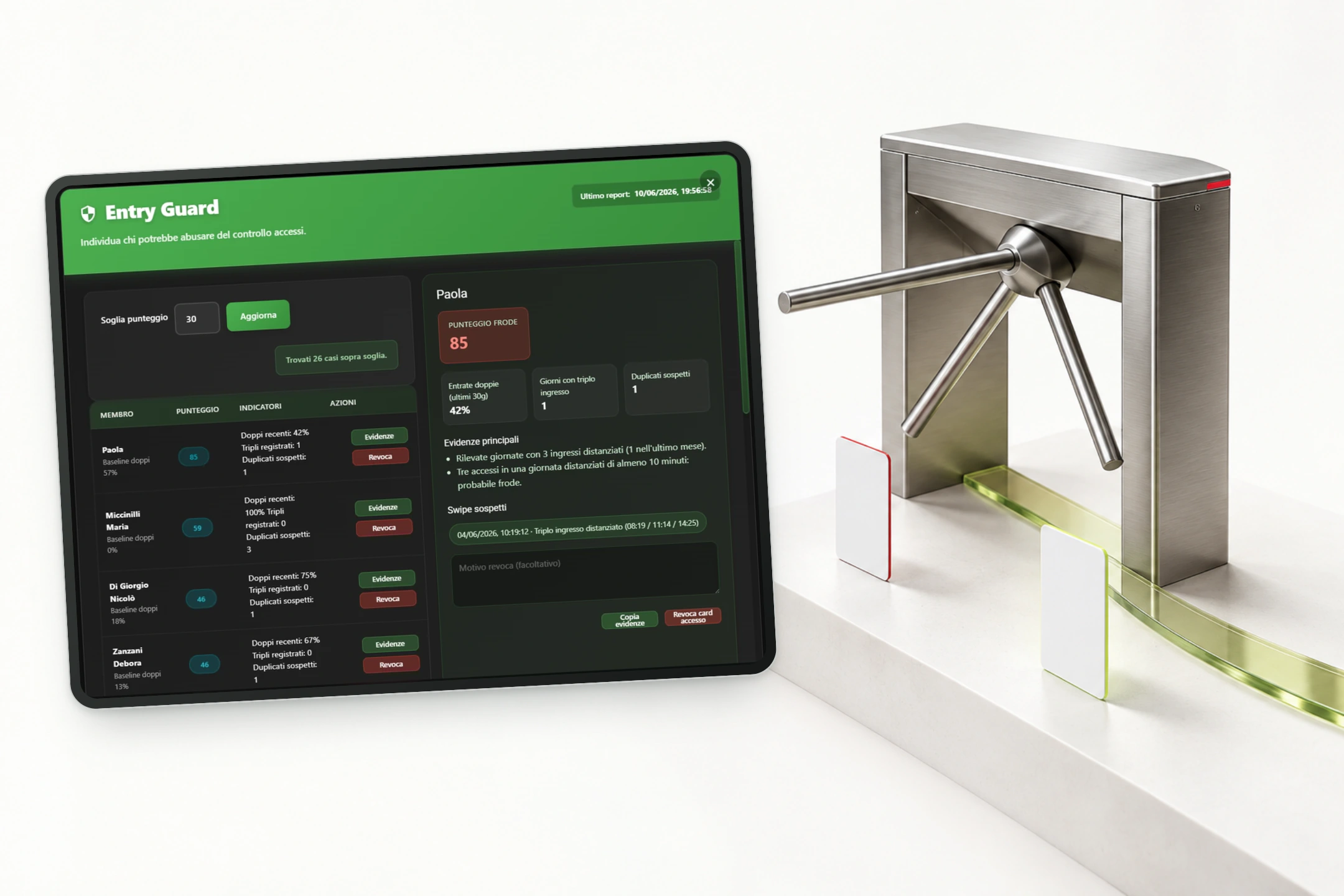
Actual EntryGuard screen beside a turnstile and two cards, distinguishing normal entries from anomalies
Entry Guard

Find the cards that need checking

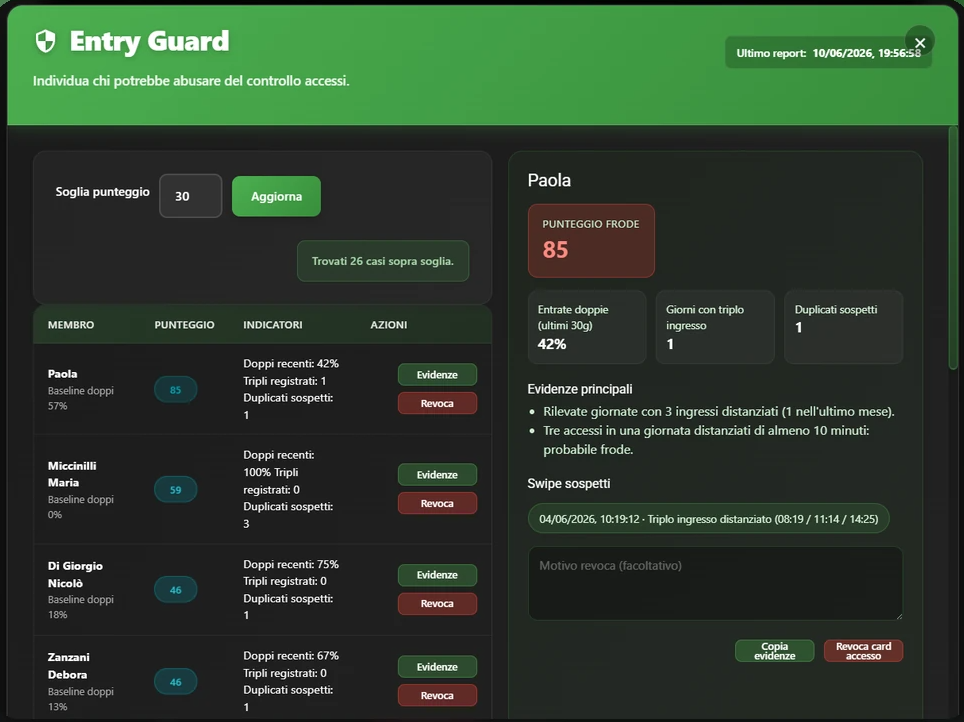
Entry Guard analyses entry history and flags possible card sharing. Review the events and revoke the card from the dashboard if misuse is confirmed.

Each alert shows the member, the reasons and the entry events to review. An unusual pattern needs checking; it is not proof of fraud.

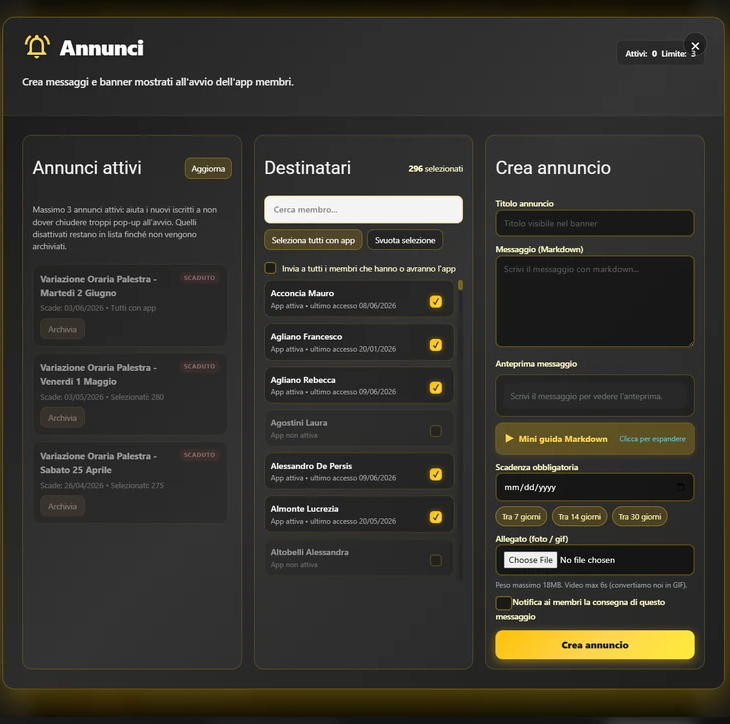
Announcements panel with recipients, title, message, attachment, expiry and notification option
Your gym
Example announcementYour gymNew Pilates class

Mondays at 6:30 pm. Book your place in the app.

Push notificationIn-app banner
In-app announcements

Your message reaches the member app

In Announcements, choose all members or specific recipients, publish a banner in your gym’s app and optionally send a push notification to their phones.

Add a title, message, photo or GIF and an expiry date. Members can find the announcement in the app even if they do not open the notification immediately.

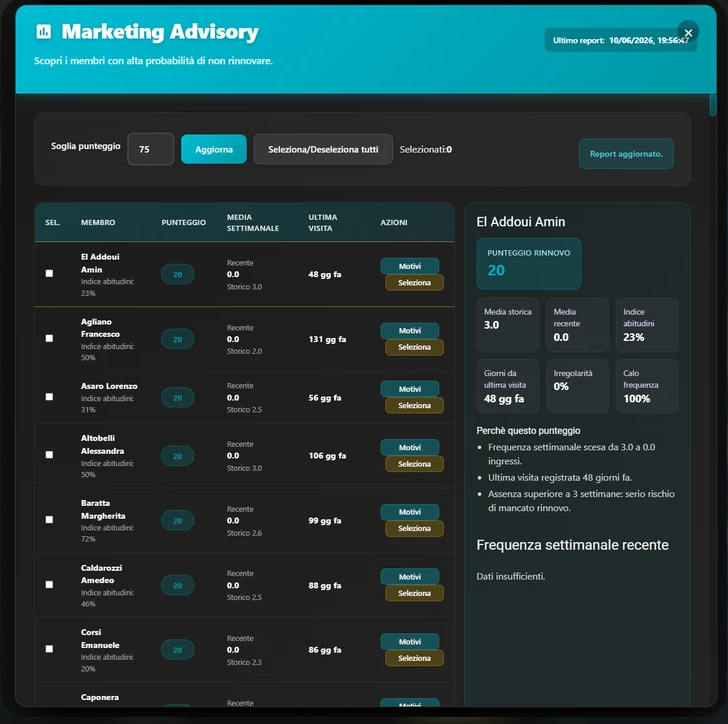
Marketing Advisory with attendance comparison, last visit and reasons for renewal risk
Illustrative trendFalling attendanceTargeted follow-up →
Marketing Advisory

See who is falling out of the habit

Marketing Advisory compares attendance, habits and last visits. It shows who is coming less often and why, helping you choose who needs a message or a tailored offer.

Open the member’s details to compare recent attendance with their usual pattern. Follow up with a clear reason before their next renewal.

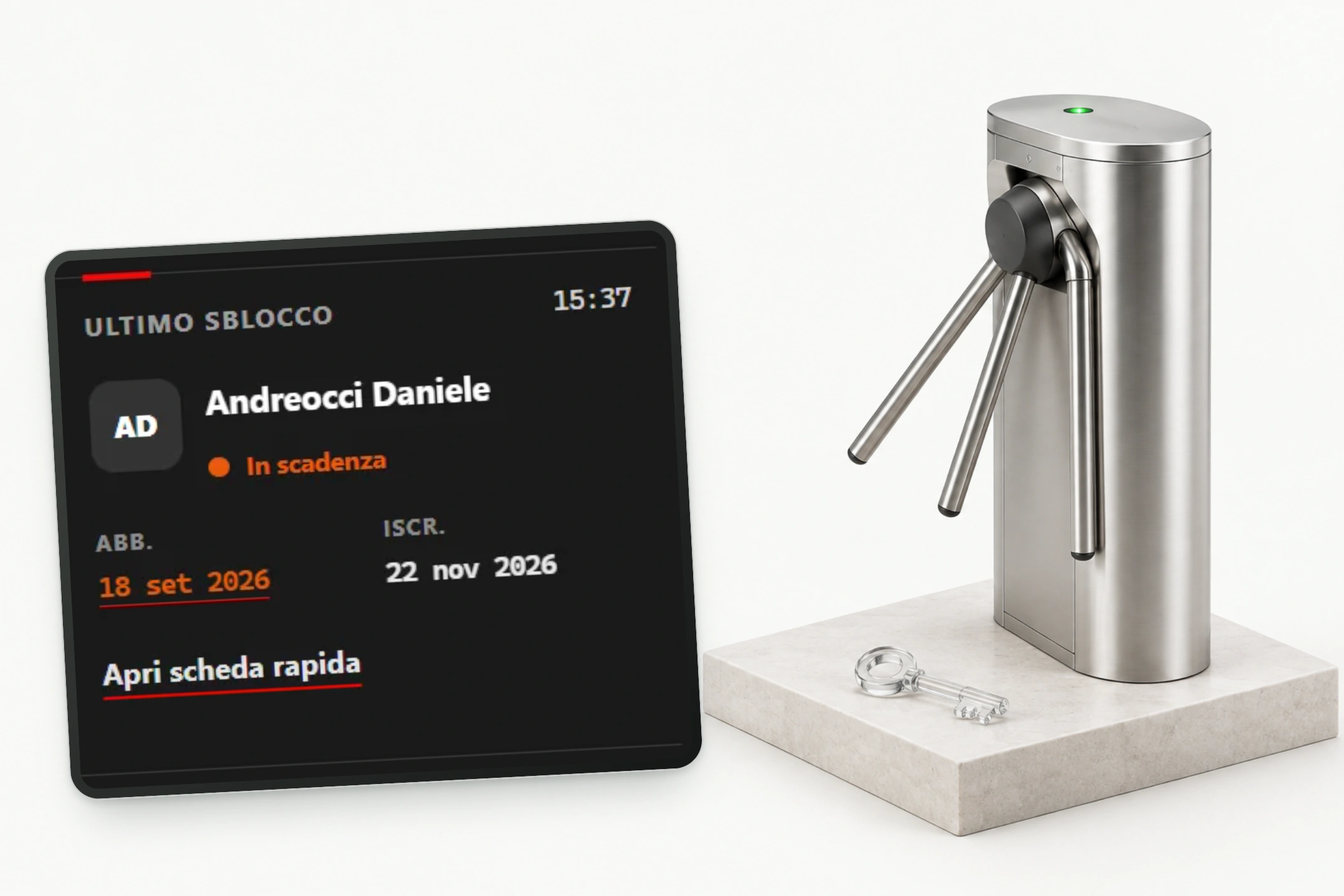
The actual last-unlock panel beside an open turnstile and a transparent key
Remote opening

Open the turnstile without returning to reception

Authorised users send an opening command remotely from the Register or trainer app, helping someone at the entrance while working elsewhere.

This command is restricted to authorised roles. In the member app, opening requires being near the turnstile.

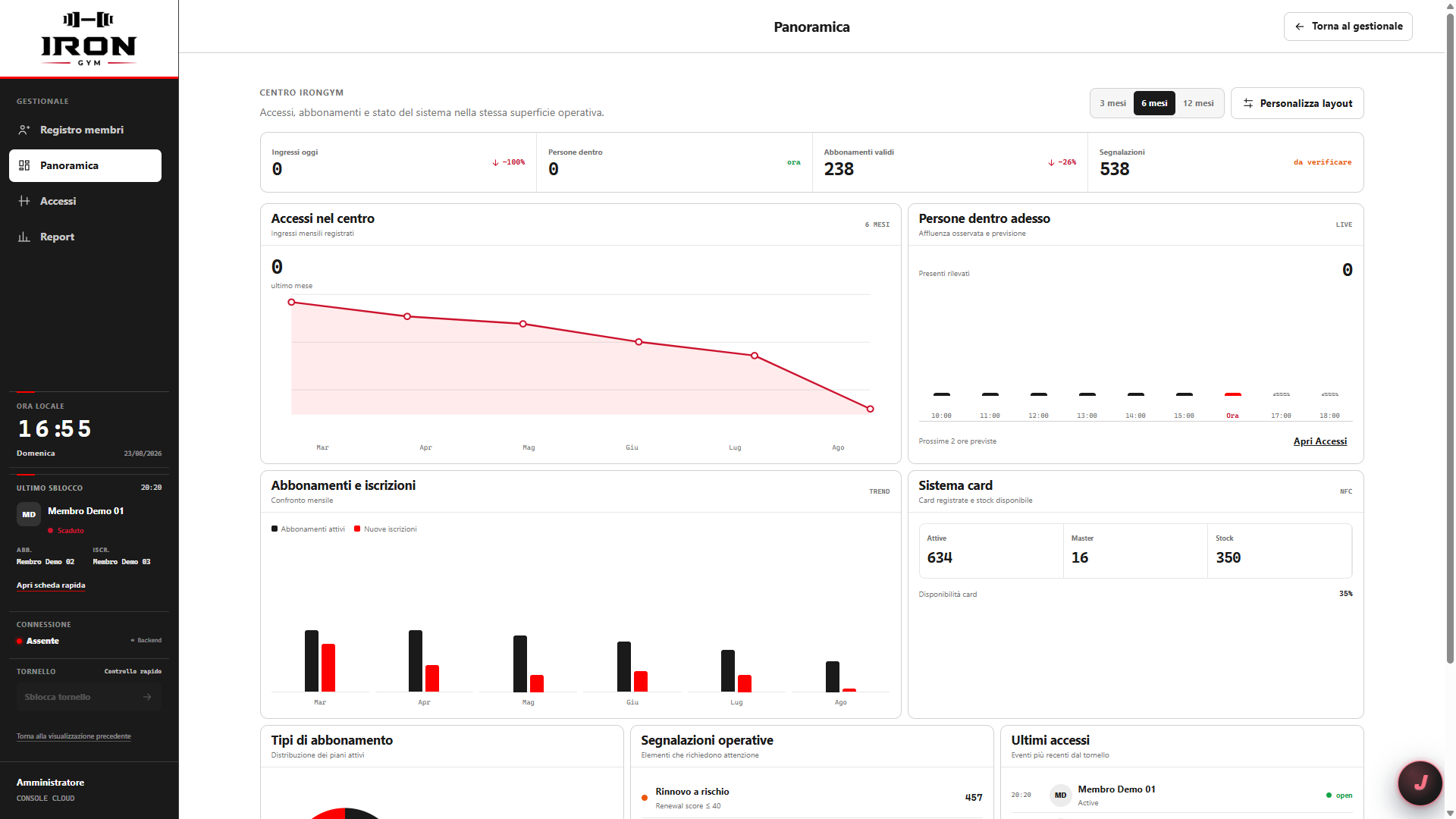
Register Overview with entry, memberships and operational alerts

Entry, memberships, alerts.

Overview

Review performance in the Register

The Register’s Overview brings together entry, memberships and attendance charts. Choose a period and review your gym’s data in one dashboard.

Member records, expiry dates and activity data are available in the browser. Start with the overview and choose the area you need to investigate.

Trainers

Plans and bookings, in the trainer app

Trainers assign plans, members log their sets and the results become part of their history. Bookings and progress are available in the trainer app.

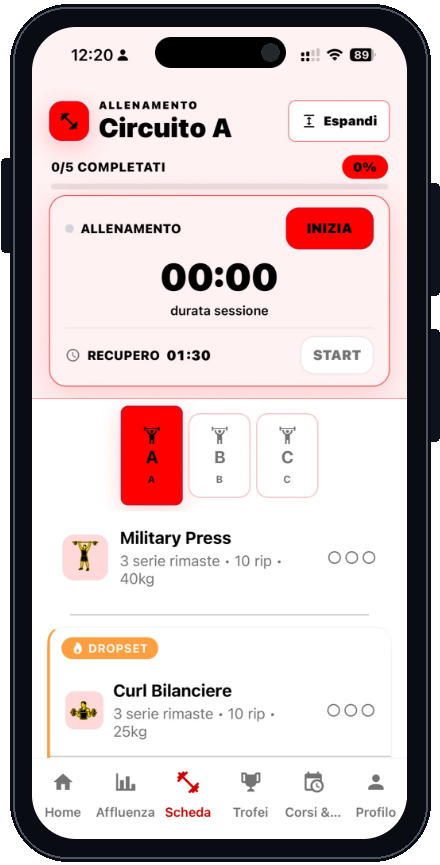
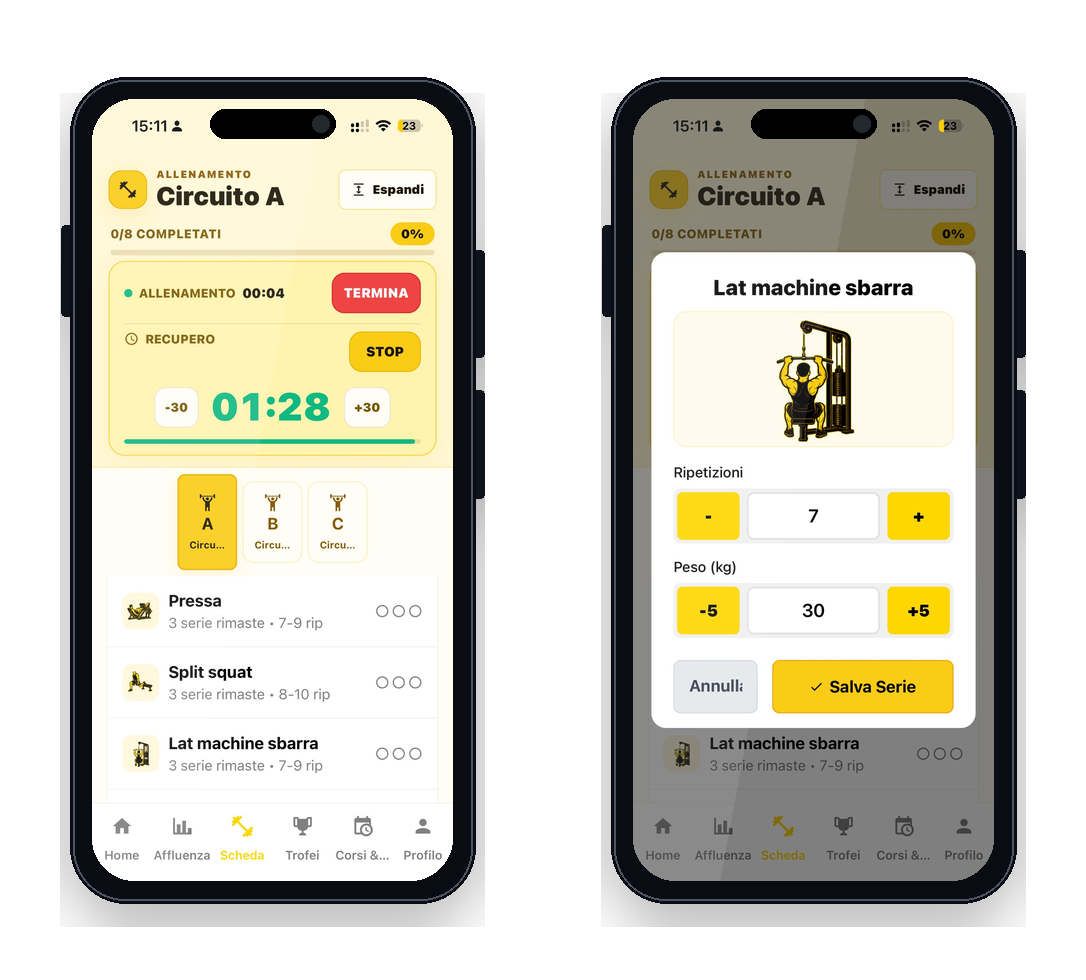
Actual digital workout plan with a circuit, exercises and timer in an iPhone mockup
Programs

Create a plan and assign it to members

Use the trainer app to arrange exercises, sets, reps and rest periods. Assign the plan to one member or a group and it appears in their app.

Update the plan and review completed work. AI tools prepare drafts for review; the trainer remains responsible for the program.

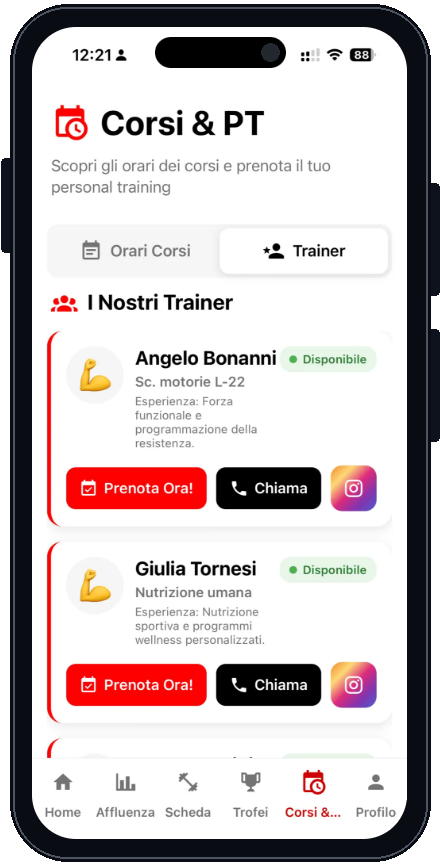
Actual Praesidium classes and bookings screen in an iPhone mockup
PT schedule

Members book. You manage the schedule.

Members book a private session in the gym’s app. Trainers see bookings and manage times, changes and cancellations in their own app.

Reminders and notices follow booking changes. Trainers can also review session hours and revenue.

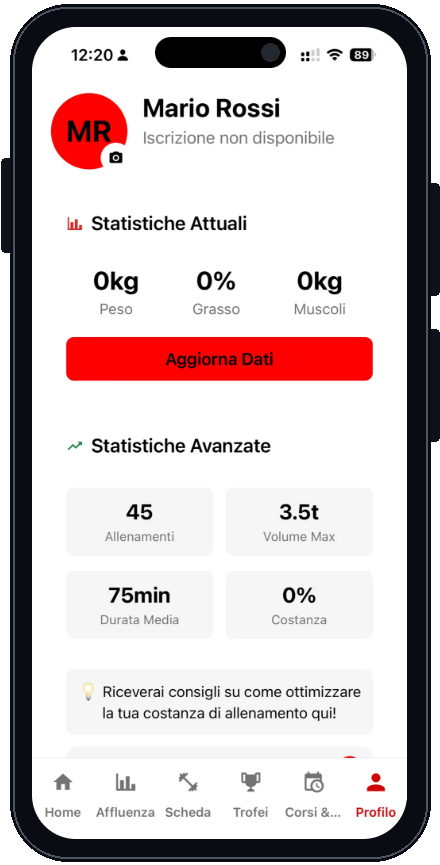
Actual Praesidium profile and statistics in an iPhone mockup
Member history

Build the next plan from actual results

Trainers can review sessions, weights, reps and the member’s visits, alongside questionnaires and progress photos the member chooses to share.

See what the member completed and how their training load changes, so the next appointment starts with a useful history.

A trainer uses her phone in the gym’s office, away from the entrance
Trainer control

Trainers can open the turnstile remotely

In the trainer app, authorised users can tap “Open turnstile” remotely, without standing in front of the reader.

Members have a different access flow: their app can open only near the turnstile. Remote opening is reserved for authorised staff.

Members

From entry to the last set, in your app

Members see your logo, open the turnstile when nearby, follow their plan and review progress: practical services for their day at your gym.

Your gym’s app

Your name on members’ phones

Members download an app with your gym’s name, logo and colours. The home screen leads to workouts, bookings, their profile and membership status.

Praesidium provides the software; members see your identity. Notifications also come from your gym’s app.

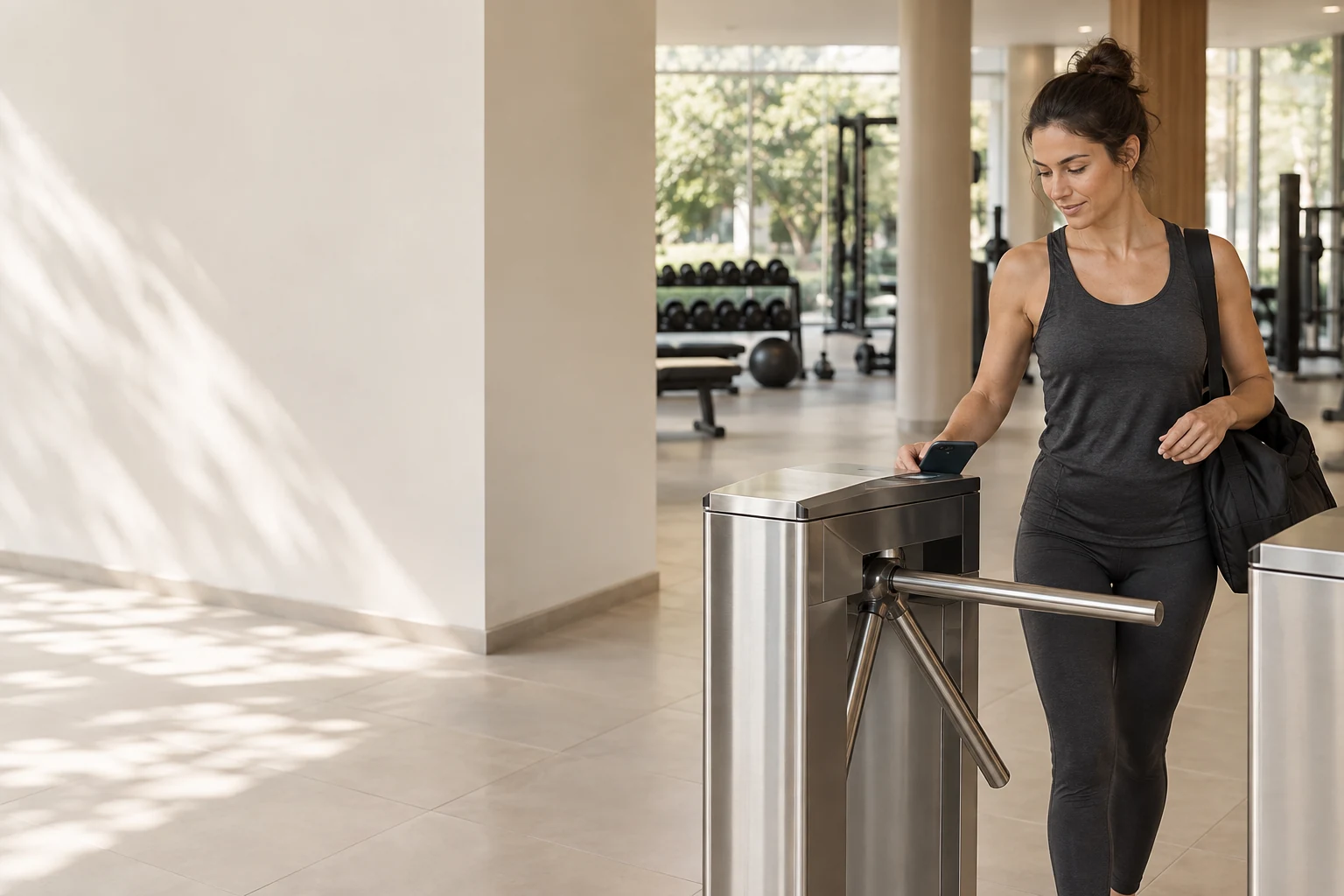
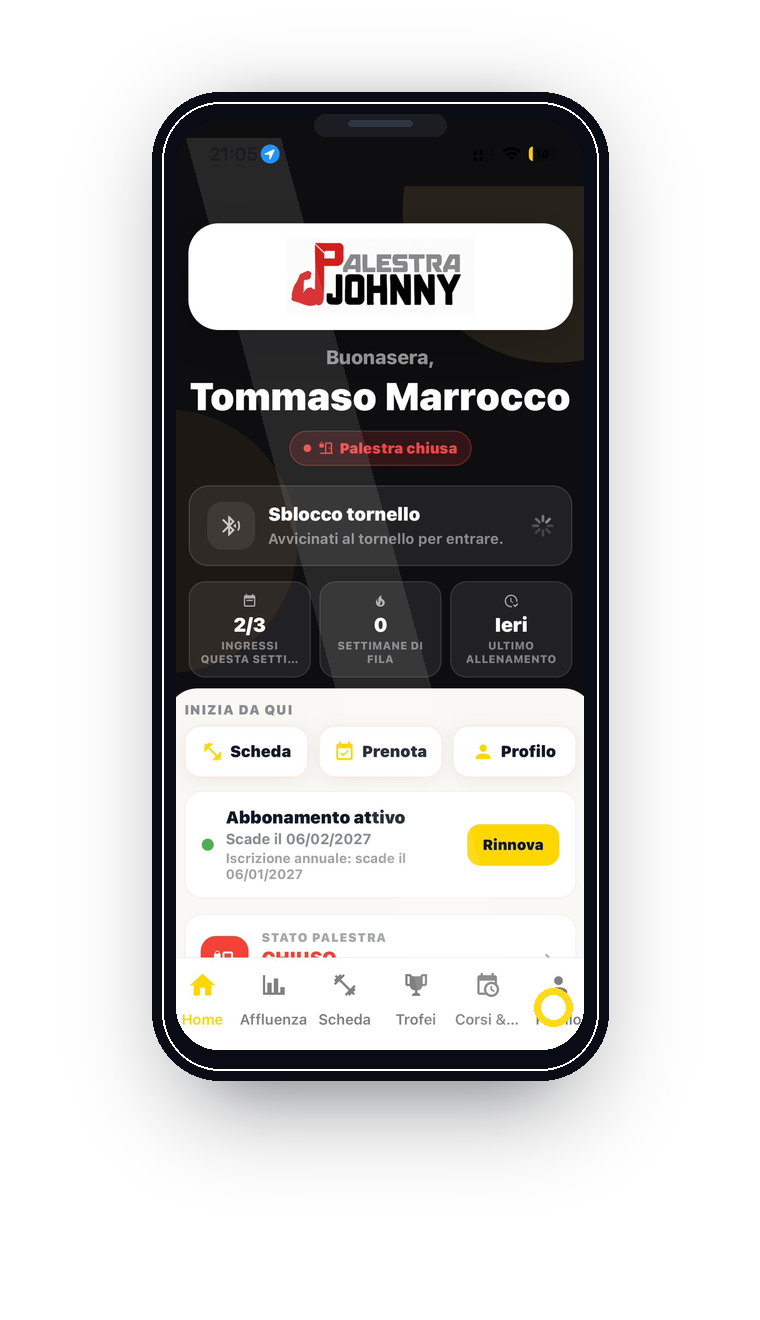
A member uses her phone beside the turnstile at the gym entranceReal member app home screen showing Open turnstile and the instruction to move close to the gate
Entry with the app

Open the turnstile when you are there

Members open the gym’s app and tap “Open turnstile”. The proximity check requires them to be near the entrance with valid access permissions.

This is the member’s personal entry flow. Remote opening is a separate function for authorised trainers and staff.

Training

Log each set as you train

Members open their assigned plan, enter weights and reps and start the rest timer. Sets, duration and results are saved to their history.

Trainers can review completed work in their app and adjust future workouts.

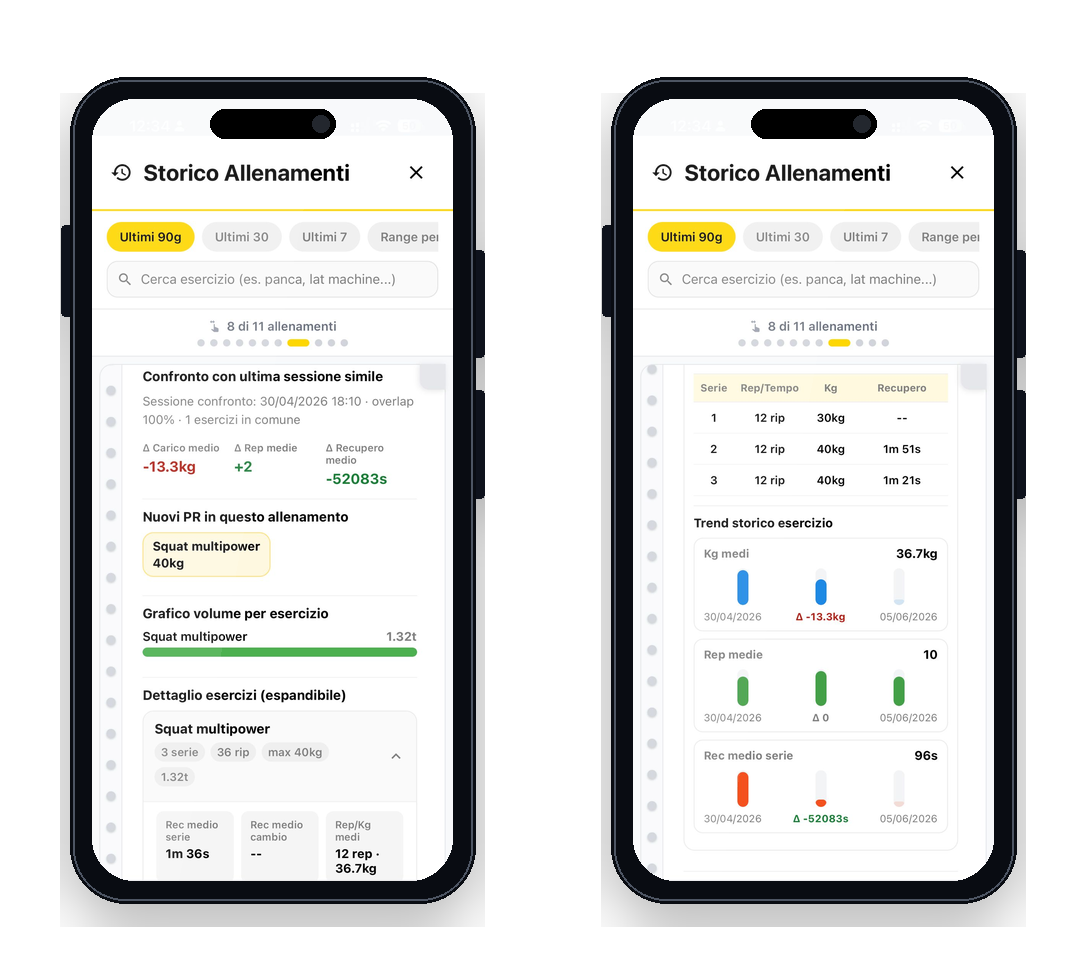
Workout history

Compare this session with the last one

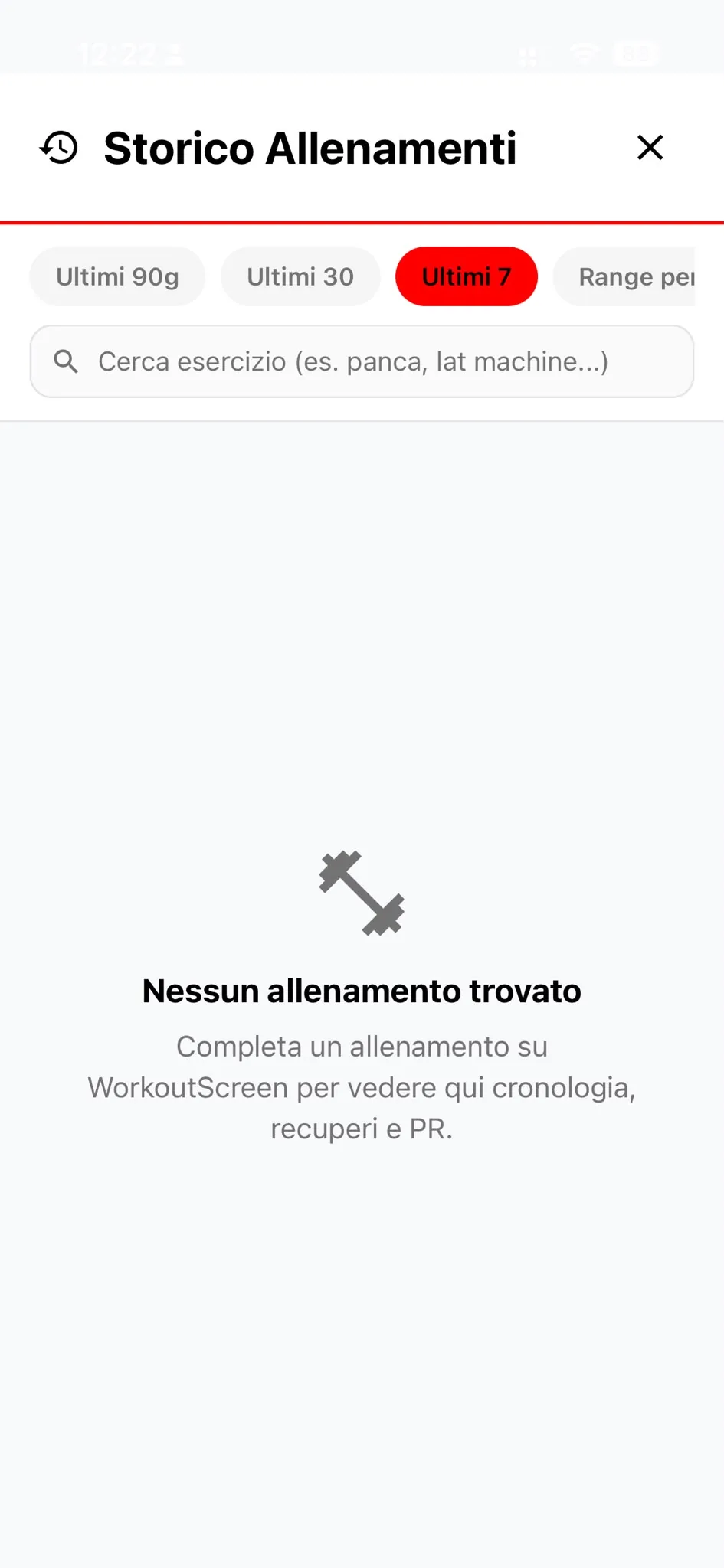
After a workout, members review weights, reps, rest periods and personal records. Comparisons make progress visible.

History, records and trophies make results visible. Trainers review sessions to adapt the plan; members can also track goals, measurements and progress photos in the app.

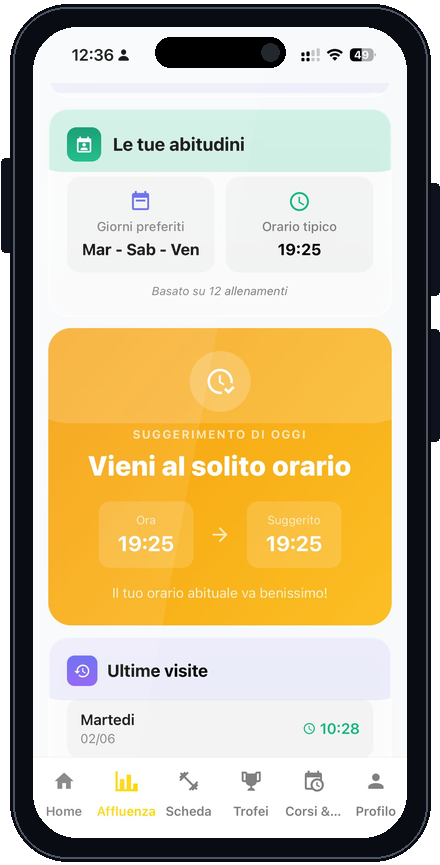
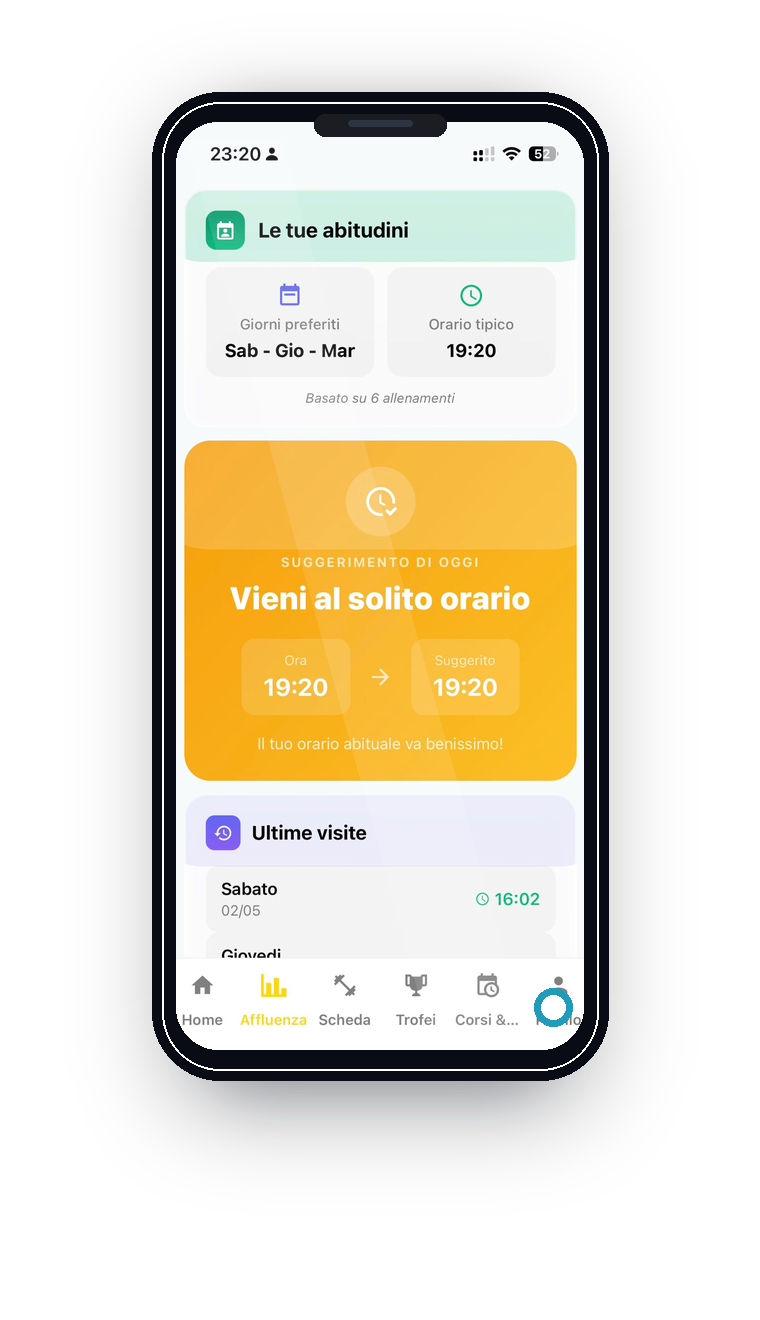
PresenceMeter

Choose a more convenient time to train

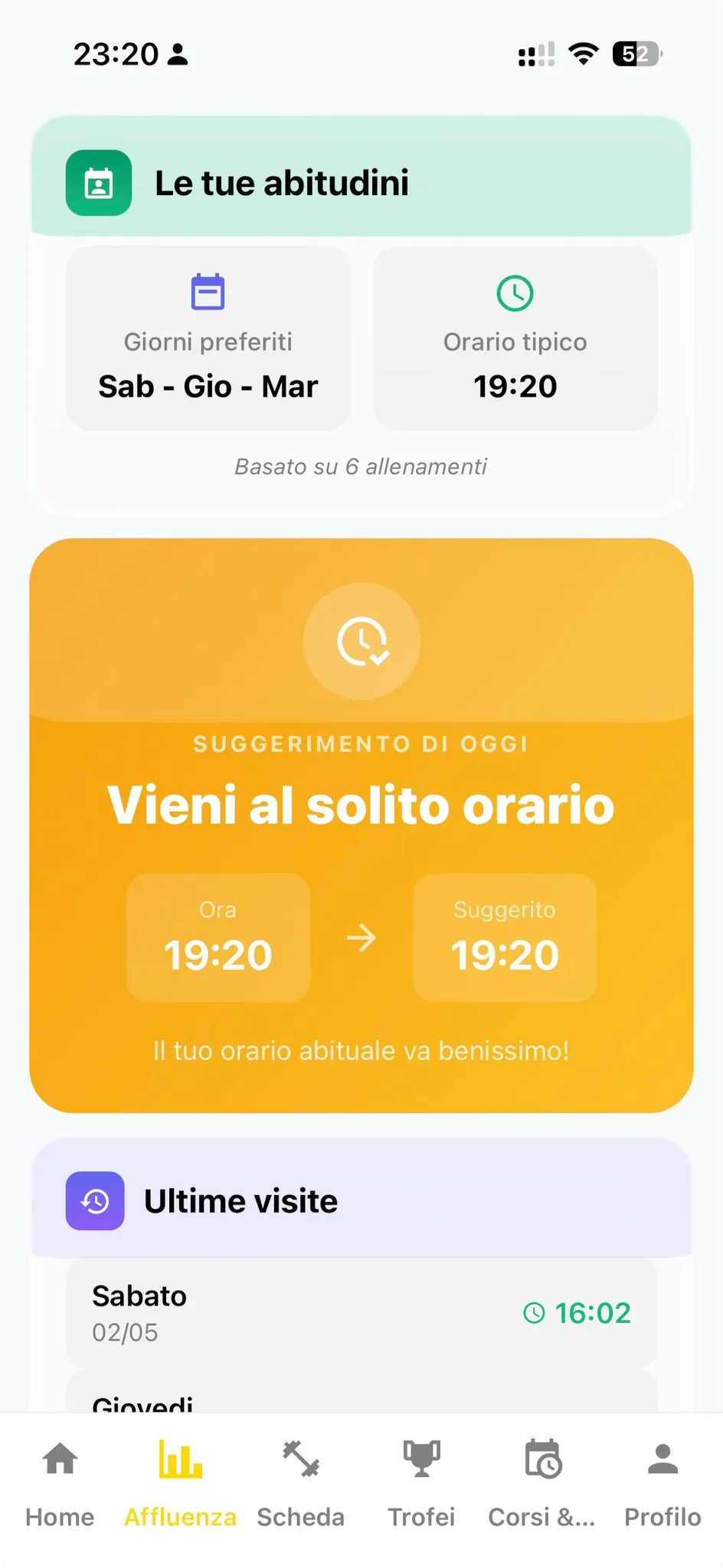
PresenceMeter uses past visits and habits to suggest when to come. Members receive advice around their usual times and remain free to choose.

The member app does not show the live number of people in the gym. It offers timing advice to help spread attendance.

A woman ready to return to the gym checks her phone in a bright entrance
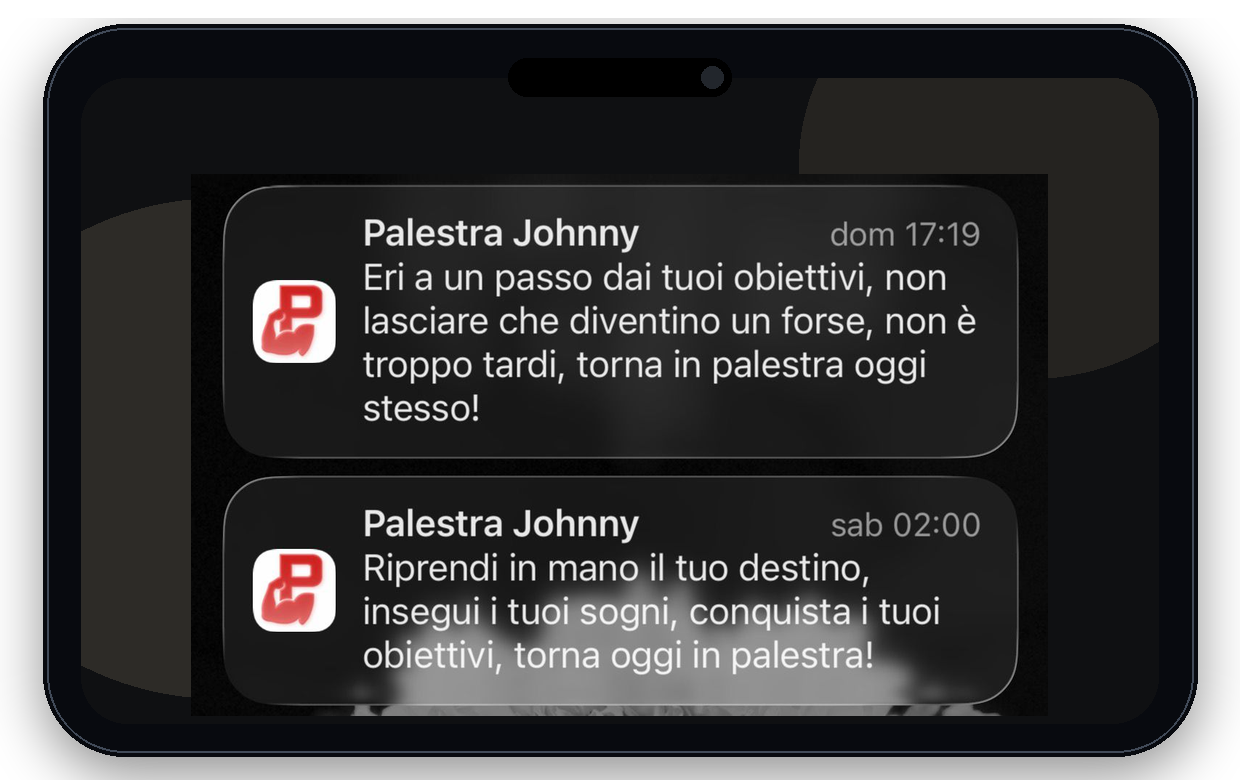
Actual gym notification inviting a member to return to training
Back to the gym

A message when your routine slips

When visits decrease, the gym can send a targeted in-app reminder. Members receive a notification from their own gym.

Marketing Advisory helps staff decide whom to contact and why, instead of sending everyone the same reminder.

One visit, from arrival to the next return

Your app guides the member. You get the information.

The phone opens the turnstile, the plan records the workout and your team gets the information to follow up. See how the features connect during a visit.

01 / Arriving at the gym

Open your app. Approach the turnstile. Enter.

Members recognise your gym’s logo on the home screen and tap “Open turnstile”. The app checks proximity: member access is used near the turnstile, subject to the gym’s access permissions.

The entry is recorded and the member’s name appears for staff. In the Register, you can review the entry and membership status even when you are away from the gym.

For members: the phone becomes their key. For you: the entry becomes part of their history.
Inside the software ↗

02 / Working out

The plan guides the session. Every set leaves a record.

After entering, members open the plan their trainer assigned. They follow exercises and circuits, log weights and reps and use the rest timer. They review their previous session and work towards new personal records.

Results stay in their history. Trainers review them in their own app, alongside feedback and photos members choose to share, and adjust the next plan.

For members: progress they can compare. For trainers: a record of completed work.
Inside the software ↗

03 / Between workouts

The relationship continues after they leave.

Members find records, trophies and progress in the app and can book their next session. Your gym sends useful announcements and reminders under its own name, straight to their phone.

If visits decline, Marketing Advisory shows staff who is coming less often, for how long and how their habits have changed. Choose a personal follow-up or a tailored offer before the absence becomes a missed renewal.

Useful services and informed follow-up: practical tools for supporting member retention.
Inside the software ↗

Inside the software

Choose a task. See how you do it.

Explore the screens and steps: what you check, where you take action and what you get back. Open the area that matters to you.

From a member’s name to their membership.

Find the member, check their status and open the quick record. Filters and expiry dates are in the same Register you use on your computer, tablet or phone.

  1. Find the member

    Search by name or filter active, expiring and expired memberships.

  2. Check their status

    Review duration, visits, membership expiry and registration expiry.

  3. Work from their record

    Open the member’s details and manage the information permitted for your role.

Answer a member’s question and check their status without relying on the reception computer.

Member Register with search, status filters and a quick record
Product screen · RegisterOpen screenshot ↗

From an alert to a card check.

Entry Guard ranks the cases that need attention. Open a member to see the reasons behind their score and the events that triggered the alert.

  1. Read the reason

    Repeated entry and changes in usual patterns can indicate card sharing.

  2. Review the events

    Check dates and times and clarify the situation with the member. A score alone does not prove misuse.

  3. Decide on revocation

    If misuse is confirmed, revoke the card in the dashboard; the action is logged.

Start with events you can inspect and finish with a decision you control.

Entry Guard with flagged members, reasons, entry events and card revocation controls
Product screen · Entry GuardOpen screenshot ↗

Write once. Members find it in your app.

Use Announcements to compose a message, choose its audience and set how long it stays active. You can also send a push notification.

  1. Choose recipients

    All members with the app, or a selection of people.

  2. Prepare the announcement

    Add a title and message, attach a photo or GIF and set an expiry date.

  3. Publish and notify

    The banner appears in the app. Enable notifications to also send an alert to eligible devices.

Hours, news and promotions stay inside the app that carries your gym’s name.

Announcements panel with recipients, title, message, attachment, expiry and notification option
Product screen · AnnouncementsOpen screenshot ↗

Understand the attendance drop before choosing a message.

Compare recent visits with usual attendance. The detail view shows the last visit, regularity and the reasons behind the renewal score.

  1. Spot the change

    Review members whose attendance has declined.

  2. Read the context

    Compare recent and historical averages and days since the last visit.

  3. Choose the follow-up

    Select recipients for a message or a suitable offer. Different members need different invitations.

You have a concrete reason to contact the member beyond their membership expiry date.

Marketing Advisory with attendance comparison, last visit and reasons for renewal risk
Product screen · Marketing AdvisoryOpen screenshot ↗

The assigned plan becomes a training history.

Members log sets during their workout. Trainers can review results and progress when planning the next session.

  1. Assign the plan

    The trainer prepares exercises, sets, loads and rest periods and assigns them to the member.

  2. Log the session

    Members follow the interactive plan, record weights and reps and use the timers.

  3. Compare and adapt

    History, records and feedback help members and trainers plan what comes next.

The coaching conversation starts from completed work, rather than a plan left on paper.

Member workout history with session data and comparisons
Product screen · Plans and trainersOpen screenshot ↗

Timing advice based on members’ habits.

PresenceMeter uses entry history and usual training times to suggest small adjustments, while leaving the choice to the member.

  1. Read the habits

    Consider days, times and visit history.

  2. Suggest a time

    Offer a time to come that helps reduce overlap during the busiest periods.

  3. Keep the choice open

    Members decide whether to follow the advice. Their app does not show live headcounts.

A practical way to help spread visits without requiring a booking for every workout.

Member app attendance advice showing preferred days, usual time and today’s suggestion
Product screen · PresenceMeterOpen screenshot ↗

Value in everyday work

From an owner’s question to a concrete action.

Praesidium’s value lies in the tasks you can complete: check a card, follow up with an absent member, update a plan and reach members through your own app.

The question you ask

  • “Is more than one person using this card?”
  • “Who has stopped coming before renewal?”
  • “What is the member actually doing in the gym?”
  • “How do I tell everyone about the new hours?”

Where you find the answer

  • Entry Guard shows entries and unusual patterns; review the case and decide whether to revoke the card.
  • Marketing Advisory compares visits and habits to help you choose whom to contact.
  • Members log their sets in the app; trainers review the history and update the plan.
  • Publish a banner in your gym’s app through Announcements and choose whether to send a push notification.

Worth a conversation?

Start with the task that costs you time today.

Bring a case from your gym to the demo: an entry to check, trainer bookings or members who have stopped returning. We will walk through the steps in the software.

Book your free fit assessment
Suspicious entries are hard to verifyRenewals and attendance reviewed too latePT bookings managed in chatsWorkout plans disconnected from member dataNo mobile app under your gym's brandMember announcements scattered across groups and messages

See what you could gain by connecting access, trainers and your member app.

Request a fit assessment

White-label member app

In the stores and on their phones, members see your gym’s name.

The name, logo, icon and colours reflect your gym. When members open the app, they find your services: entry, workouts, bookings, progress and announcements.

An app members recognise before they open it.

Praesidium provides the software. Your gym chooses its name, icon, logo and colours: the identity members see in the store, on the home screen and in notifications.

Colors and styling that adapt to your brand
Available onPlay StoreAvailable onApp Store
IdentityYour gym's name, icon, colors and store listing
ServicesAccess, plans, schedules, trophies, profiles and push notifications
ContinuityEvery app visit strengthens your gym's brand

A practical digital presence: a branded touchpoint your members use every week, extending well beyond a logo.

Already in use

See workflows used every day by PalestraJohnny and ARES Fitness.

Access, turnstiles, the member app, workout plans, trainers and communication have already been put to work in operating sports centers. That experience helps us build the right workflows for your gym.

Active installations2 gyms

PalestraJohnny and ARES Fitness use Praesidium in their daily operations.

App storesiOS + Android

Member apps with the gym's own name, icon and identity.

Physical turnstileNFC + app

Access, verification and app-based opening connected to the turnstile.

Direct channelPush

Direct communication without relying on external groups.

Active client

PalestraJohnny

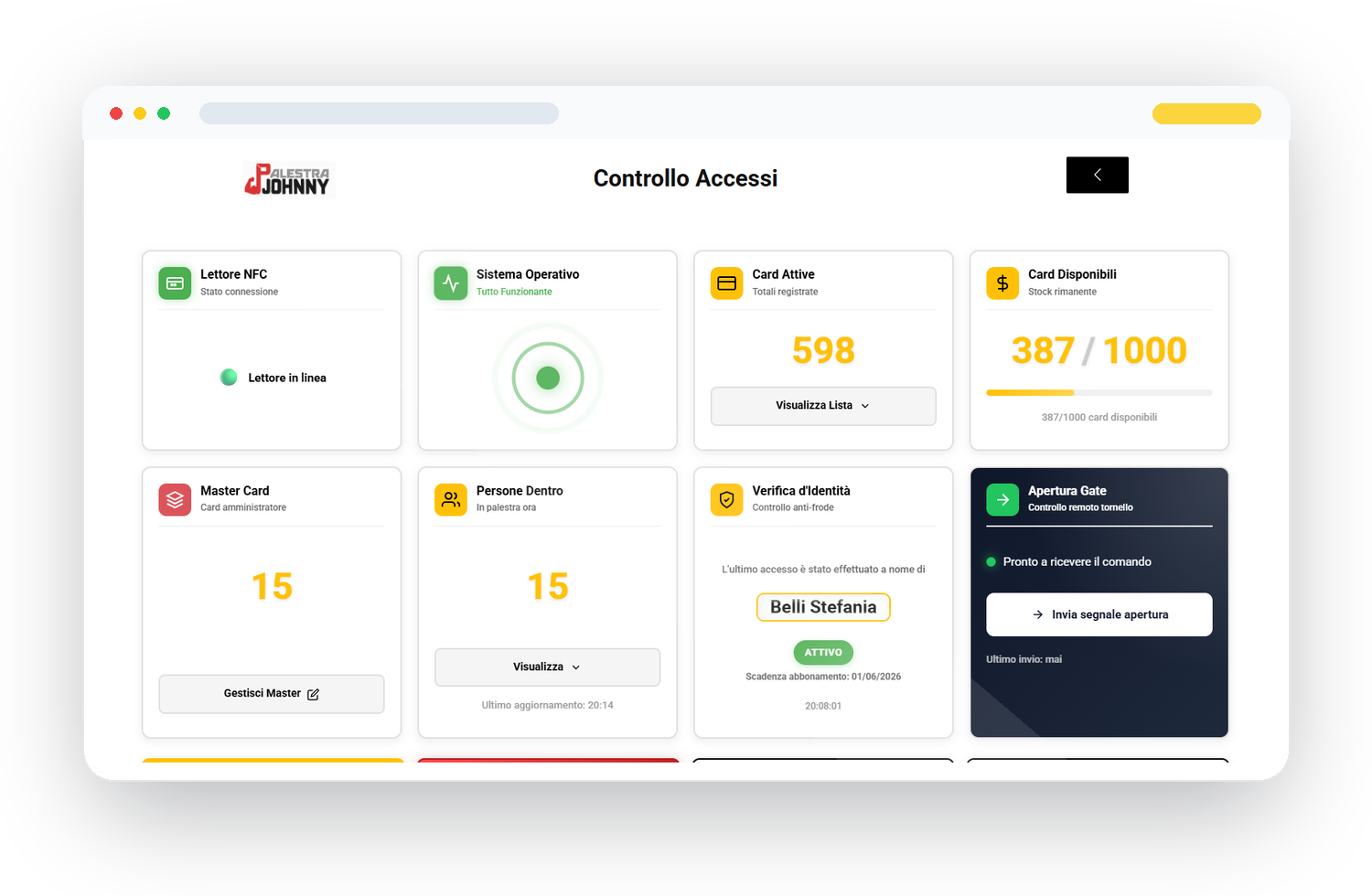
Internal management software, EntryGuard, a white-label member app and Trainer Suite connected to the turnstile.

Praesidium staff console on desktopBranded Praesidium member app
Staff console, access fraud prevention, member app and Trainer Suite working with a physical turnstile.
Active client

ARES Fitness

Praesidium by Numen management software with a white-label app published on the stores under the ARES brand.

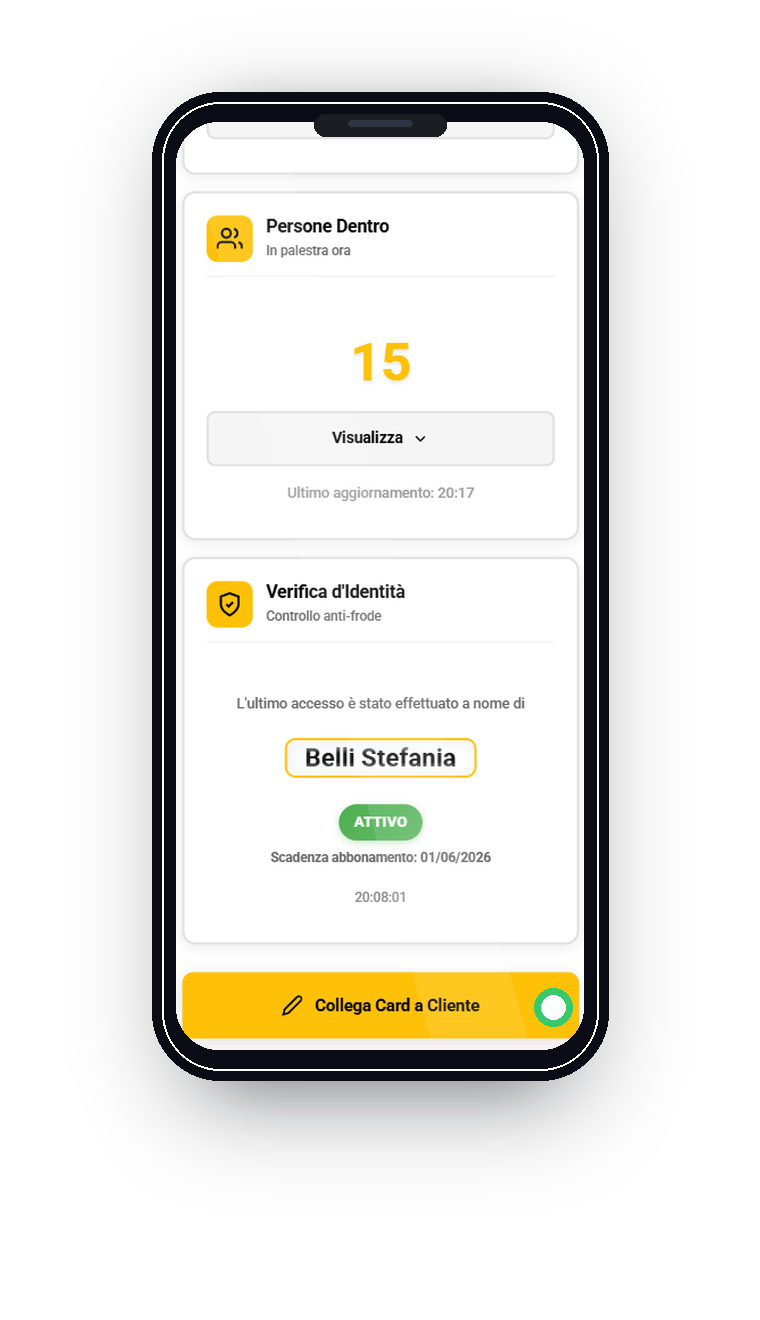
Praesidium staff console on mobileAttendance module in the Praesidium member app
White-label app, attendance, communication and member data in one system.

Getting started

First, agree on the path. Then bring the system to life.

Our supplier's turnstile arrives preconfigured for Praesidium. We prepare the software, access and app before launch, then guide your staff remotely. No on-site Praesidium technician is required, wherever your gym is located.

01

Operational fit assessment

Understand your gym as it works today

We review the turnstile, subscriptions, staff, trainers, member app, communication and data together to understand where you are losing control today.

Output: operational priorities, technical constraints and the first areas to address.
02

Decisions before setup

Choose what to activate now and what can follow

Features have different levels of impact in the first month. We prioritize what reduces risk, manual work and confusion, then plan what can come later.

Output: a clear activation roadmap and realistic commitments.
03

Console & roles

Prepare the staff workflow

The console, roles, access, renewals, attendance and communication are set up around your gym's workflow. Staff practice operations they recognize from their day-to-day work.

Output: a staff area ready for work on a computer, tablet or phone.
04

Member app

Bring your brand to the member's phone

The name, icon, colors, services, notifications and member features are aligned with your gym's identity, creating a channel of your own.

Output: a member experience consistent with your gym's identity and services.
05

Guided practice

Staff and trainers learn the workflow before members do

Access, workout plans, bookings, announcements and essential procedures are tested before go-live, so everyone knows the system before using it with customers.

Output: people trained on real situations.
06

Controlled go-live

Launch, observe, adjust

The first live cycles are followed closely: entries, anomalies, the member app, communication and staff support. Launch is a supported operational step.

Output: an active system with oversight of the first important signals.
Operational continuity

Change with a clear view ahead.

The rollout is gradual: first, protect access, staff and data; then improve service, retention and automation. Your gym gets a system it can manage.

  • Know in advance what integrates, what needs adaptation and what can wait.
  • Staff roles, trainers and procedures are defined before launch.
  • The first real entries, member app interactions and communications are monitored.

Questions before the demo

Get clarity before investing time and budget.

Pricing, turnstiles, data, GDPR, store timelines and operational continuity vary by gym. The demo helps establish whether Praesidium fits, which modules should come first and where it can deliver value at the right scale.

Will it work with my turnstile?

It depends on the model and existing access control. Integration, app-based opening, NFC and technical constraints are checked during the fit assessment before installation is proposed.

Do I need to replace my management software?

You may not need to change everything at once. Praesidium can start as a complete ecosystem or support selected existing operations, after a review of data, memberships, access and staff workflows.

How long does publishing the app take?

It depends on the brand assets, store listings, checks and app review times. A reliable estimate follows the fit assessment.

Do I own my members' data?

Yes. Member data, access records, history and operational content remain tied to your gym. The setup must respect roles, consent, security and GDPR responsibilities.

How much does it cost?

It depends on the modules, turnstile, app, data migration and support you need. The quote is based on your actual situation, after the free demo.

What happens if the internet or local PC stops working?

This scenario is planned during setup. Fallback procedures, roles and responsibilities are defined so staff know what to do if a device or the connection has a problem.

Can you migrate existing data?

Yes, if the data can be exported in a usable format. Its format, quality and structure are assessed before committing to timing or a final result.

Start for free

See Praesidium handle a task from your gym.

Leave your contact details and choose your main challenge. In the demo, we will work through it in the software, check your turnstile requirements and define what belongs in your quote.

  • See a live demo of the staff tools, Trainer Suite and member app.
  • Clarify turnstile compatibility, app stores and existing data.
  • Clarify included features, setup and cost for your gym.
  • Get a quote with services and onboarding clearly defined.

No obligation: we first assess technical feasibility and operational value.

Book a demoFree